# TOMCAT项目结构 !\[Springboot war\](https://z3.ax1x.com/2021/06/26/R8YDfg.png) \`\`\`xml index.jsp index1.jsp servlet1 net.test.TestServlet servlet1 \*.d
 发布于 2026-05-17
!\[请输入图片描述\]\[1\] !\[请输入图片描述\]\[2\] \[1\]: https://img1.imgtp.com/2022/07/30/OQFPCgdo.png \[2\]: https://img1.imgtp.com/2022/07/30/AWjWZxSp.png
发布于 2026-05-17
## 1.实现ServletContextAware接口并重写其setServletContext方法 \`\`\`java @Component public class TestStarted implements ServletContextAware { /\*\* \* 在填充普通bean
发布于 2026-05-17
# Nacos搭建 - 创建文件conf/cluster.conf 配置地址 \`\`\`shell ip1:port1 ip2:port2 # nacos对应的ip与端口,每个ncaos都要有本文件 \`\`\` - 然后修改application.properties对应端口 - 数据库使用同一
发布于 2026-05-17
# 传统架构 分布式+Dubbo !\[image-20200906111828992\](https://i.loli.net/2020/09/06/9jUCHOSyFZqTpWk.png) # 微服务架构 ## 微服务架构的优缺点 微服务关注的是敏捷,快速开发 !\[image-20211126
发布于 2026-05-17
# Managing the Application Availability State \`\`\`java @Component public class ReadinessStateExporter { @EventListener public void onStateChange(Ava
发布于 2026-05-17
!\[请输入图片描述\]\[1\] !\[请输入图片描述\]\[2\] !\[请输入图片描述\]\[3\] !\[请输入图片描述\]\[4\] \[1\]: https://img1.imgtp.com/2022/07/30/ViPN6RDT.png \[2\]: https://img1.imgt
发布于 2026-05-17
``` # 新建测量器 m = tf.keras.metrics.Accuracy() # 写入测量器 m.update_state([0,1,1],[0,1,2]) # 读取统计信息 m.result() # 准确率为0.66 # 清除 m.reset_states() ``` ``` acc_m
发布于 2026-05-17
  * MeanAbsoluteError (绝对值误差,用于回归,可以简写为MAE,函数形式为mae) * MeanAbsolutePercentageError
发布于 2026-05-17
发布于 2026-05-17
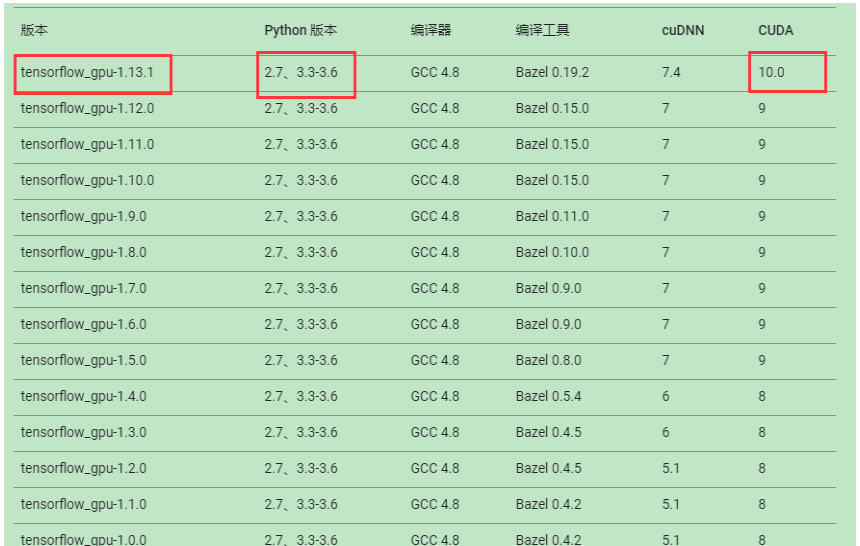
Tensorflow2.0 1. # Tensorflow 简介 1. ### Tensorflow是什么 1. #### Google开源软件库 1. 采用数据流图,用于数值计算 2. 支持多平台 GPU CPU 移动设备 3. 最初用于深度学习,变得通用 2. #### 数据流图 1. 节点--
发布于 2026-05-17
# 数据载体 \| python:list,列表 \| numpy:ndarray \| tensorflow:tensor,多维数组 \| \| ------------------------------------------------------------ \| ------------
发布于 2026-05-17
自定义网络层 ====== 自定义层需要继承tf.keras.layers.Layer类,重写init,build,call * __init__,执行与输入无关的初始化 * build,了解输入张量的形状,定义需要什么输入 * call,进行正向计算 ``` class MyDense(tf.ke
发布于 2026-05-17
1,通过设置环境变量"TF_CPP_MIN_LOG_LEVEL"控制log级别 Level Level for Humans Level Description 0 DEBUG all messages are logged (Default) 1 INFO INFO messages are no
发布于 2026-05-17
# 更新系统 sudo apt update && sudo apt upgrade -y # 安装 KVM、libvirt、virt-install 等核心组件 sudo apt install -y qemu-kvm libvirt-daemon-system libvirt-clie
发布于 2026-05-17
