基本配置
# 当前项目下配置
git config -l
# 查看全局配置 ~/.gitconfig
git config --global --list
# 查看系统配置  ../git/etc/gitconfig
git config --system --list
# 设置全局用户名,邮箱
git config --global user.name "xxx"
Git
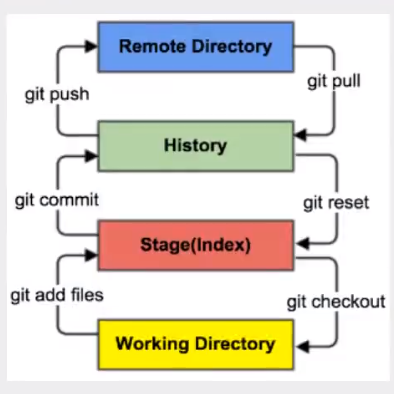
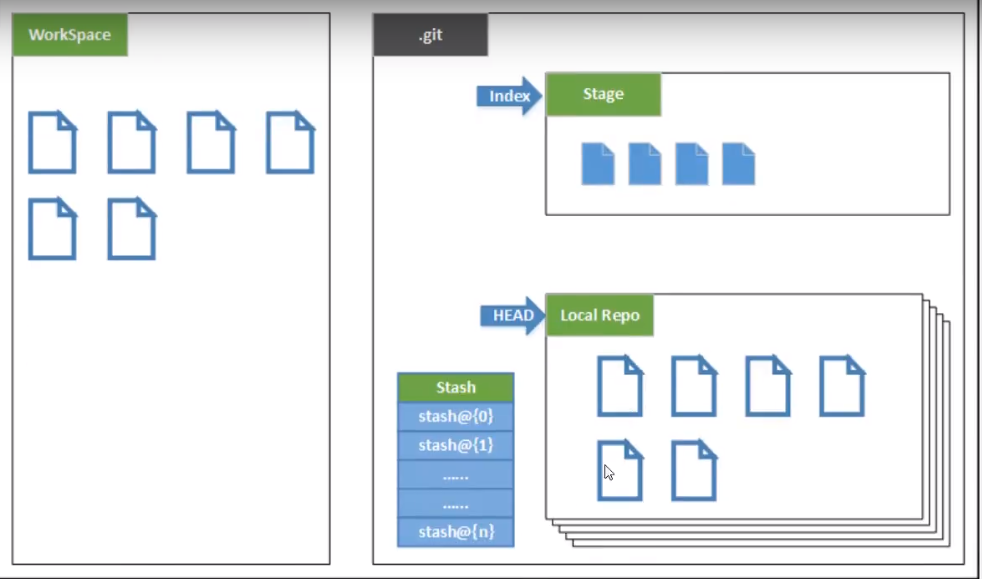
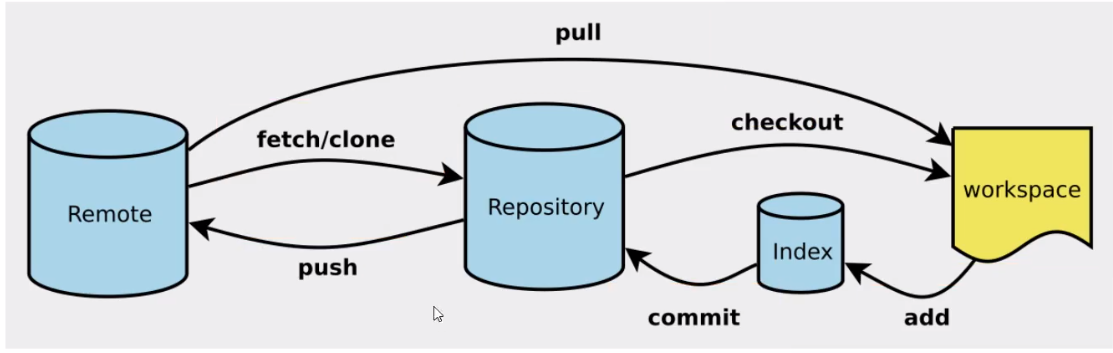
Git创建步骤
git init
git clone
绑定ssh
# 用户家目录 运行即可windows 相同命令
ssh-keygen -t rsa
# 将公钥上传github即可
IDEA使用Git
- 创建项目
- 连接远程仓库
- github创建仓库
- clone
- 将仓库复制到项目
Git分支
git reset 撤销上一次 commit
git branch
git branch -r
git branch new_branchname
git checkout -n branch
git merge branch # 指定分支合并到当前,冲突需要手动选择
git branch -d branch # 删除分支
git push origin --delete branch # 删除远程分支
git branch -dr remote/branch
参考:https://static.dean0731.top/pdf/git.pdf